
%20--%3e%3cpath%20d='M2025.4,806.8c-2.5,20.1-16.2,38.2-34.5,45.1-3.4,1.3-8.4,2.3-14.6,3.2-14.2,1.9-34.3,2.8-53.7,2.7h-.2c-23.1-.1-45.1-1.7-54.4-4.4-2.5-.7-4.9-1.6-7.2-2.7-.2,0-.3-.2-.5-.2-8.2-3.8-15.6-9.8-21.1-17.1-5.7-7.6-9.4-16.8-10-27,0,0,0,0,0,0-.5-3.1-.8-6.3-1.1-9.7-.5-7.2-.9-16.4-1-26.5h281.9c0-63.9-2.2-130.2-61.1-167.8-37.4-23.8-95.6-24.8-152.9-22.2-52.8,2.3-90.5,17.6-115.3,46.6-24.2,28.3-35.5,68.9-34.5,125.8h0c.2,12.6,1,26,2.4,40.2.3,3.1.6,6.2,1,9.4,2.9,25.9,12.9,50.3,28.9,70.4,10.9,13.8,24,24.9,38.8,32.8,7.6,4.1,15.7,7.4,24.1,9.8,17.8,5,52.5,7.8,87.8,7.8s64.2-2.2,84.5-7.1c2.9-.7,5.5-1.4,7.8-2.2,45-15,82.5-60.5,85.6-106.7h-80.6ZM2025.3,709.9h-198.3v-2.6c0-33.2,26.7-58.2,64.8-58.2h72.8c30.3,0,60.8,24.9,60.8,58.2v2.6Z'/%3e%3cpath%20d='M1620.8,806.8c-2.5,20.1-16.2,38.2-34.5,45.1-3.4,1.3-8.4,2.3-14.6,3.2-14.2,1.9-34.3,2.8-53.7,2.7h-.2c-23.1-.1-45.1-1.7-54.4-4.4-2.5-.7-4.9-1.6-7.2-2.7-.2,0-.3-.2-.5-.2-8.2-3.8-15.6-9.8-21.1-17.1-5.7-7.6-9.4-16.8-10-27,0,0,0,0,0,0-.5-3.1-.8-6.3-1.1-9.7-.5-7.2-.9-16.4-1-26.5h281.9c0-63.9-2.2-130.2-61.1-167.8-37.4-23.8-95.6-24.8-152.9-22.2-52.8,2.3-90.5,17.6-115.3,46.6-24.2,28.3-35.5,68.9-34.5,125.8h0c.2,12.6,1,26,2.4,40.2.3,3.1.6,6.2,1,9.4,2.9,25.9,12.9,50.3,28.9,70.4,10.9,13.8,24,24.9,38.8,32.8,7.6,4.1,15.7,7.4,24.1,9.8,17.8,5,52.5,7.8,87.8,7.8s64.2-2.2,84.5-7.1c2.9-.7,5.5-1.4,7.8-2.2,45-15,82.5-60.5,85.6-106.7h-80.6ZM1620.8,709.9h-198.3v-2.6c0-33.2,26.7-58.2,64.8-58.2h72.8c30.3,0,60.8,24.9,60.8,58.2v2.6Z'/%3e%3cpath%20d='M2968.1,806.8c-2.5,20.1-16.2,38.2-34.5,45.1-3.4,1.3-8.4,2.3-14.6,3.2-14.2,1.9-34.3,2.8-53.7,2.7h-.2c-23.1-.1-45.1-1.7-54.4-4.4-2.5-.7-4.9-1.6-7.2-2.7-.2,0-.3-.2-.5-.2-8.2-3.8-15.6-9.8-21.1-17.1-5.7-7.6-9.4-16.8-10-27,0,0,0,0,0,0-.5-3.1-.8-6.3-1.1-9.7-.5-7.2-.9-16.4-1-26.5h281.9c0-63.9-2.2-130.2-61.1-167.8-37.4-23.8-95.6-24.8-152.9-22.2-52.8,2.3-90.5,17.6-115.3,46.6-24.2,28.3-35.5,68.9-34.5,125.8h0c.2,12.6,1,26,2.4,40.2.3,3.1.6,6.2,1,9.4,2.9,25.9,12.9,50.3,28.9,70.4,10.9,13.8,24,24.9,38.8,32.8,7.6,4.1,15.7,7.4,24.1,9.8,17.8,5,52.5,7.8,87.8,7.8s64.2-2.2,84.5-7.1c2.9-.7,5.5-1.4,7.8-2.2,45-15,82.5-60.5,85.6-106.7h-80.6ZM2968,709.9h-198.3v-2.6c0-33.2,26.7-58.2,64.8-58.2h72.8c30.3,0,60.8,24.9,60.8,58.2v2.6Z'/%3e%3cpath%20d='M2402,586.8c-33.3-9.5-98.1-9.6-133.7-3.3-28.1,4.9-55.3,19.7-76.7,41.5-21.4,21.8-35.7,49.3-40.3,77.5-10.8,65.9,0,123.9,30.3,163.2,24.8,32.1,61.3,50.7,108.4,55.2,14.2,1.3,27.5,2,40.1,2,30.6,0,56.9-4,79.6-12,39.8-14,69.4-40,86-79.2,8.9-20.9,11.3-36.7,11.3-59.5v-1h-78.2s1.1,63.5-43.7,75.9c-26.4,6.3-75.2,4-98.6,2.3-17.8-1.3-31.6-7.1-41-17.3-9-9.8-14.2-24-15.4-42.1-1.9-28.8-2.6-90.3,7.3-109.2,7.1-13.5,21.4-23.8,37.3-27,23-4.5,98.1-4.2,117.7,3.4,37.1,14.4,36.3,55.9,36.3,55.9h78.2v-2c0-26.6-10.5-55.1-31.4-78.7-19.5-21.9-47-37.8-73.7-45.4Z'/%3e%3crect%20x='2557.8'%20y='492.7'%20width='80.1'%20height='422.1'/%3e%3cpolygon%20points='1119.3%20831.5%201007.4%20585.6%20913.1%20585.6%201065%20913.6%201065.5%20914.8%201173%20914.8%201325.4%20585.6%201231.2%20585.6%201119.3%20831.5'/%3e%3cpolygon%20points='265%20601.6%20265%20810.4%20627.6%201019.1%20627.6%201019.1%20627.6%201019.1%20627.6%201019.1%20627.6%201019.1%20808.9%20914.8%20808.9%20706%20627.6%20810.4%20265%20601.6'/%3e%3cpolygon%20points='808.9%20706%20808.9%20497.2%20627.6%20601.5%20808.9%20706'/%3e%3c/svg%3e)
Getting started with Chiplab: run firmware without the hardware
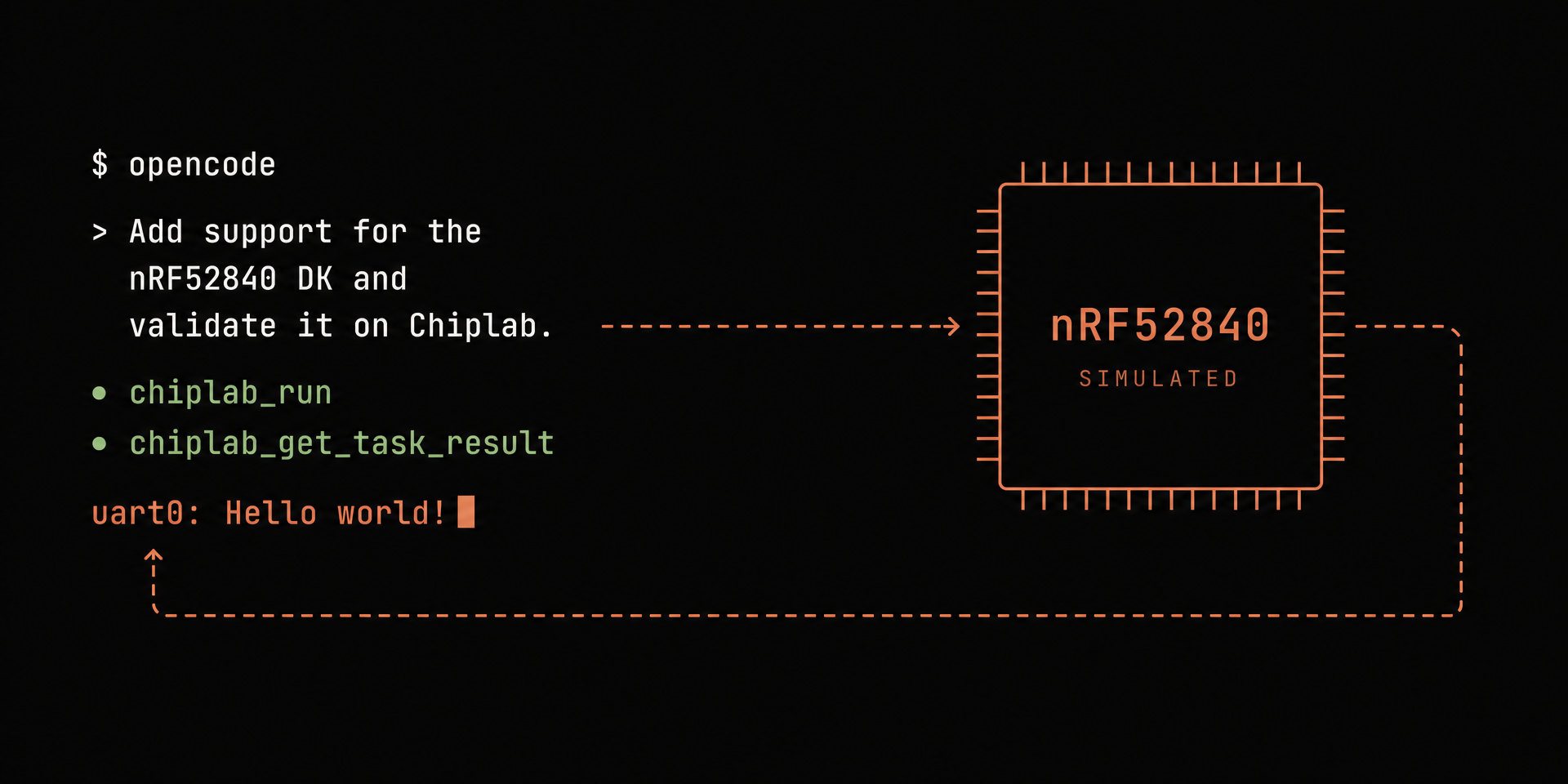
Coding agents are useful because of a tight feedback loop: write code, run it, read the output, fix it. In embedded development that loop breaks at the hardware. An agent can write firmware, but it can't flash your board, can't watch the UART, and can't tell whether what it wrote actually works.
Chiplab closes that loop. It's a hosted service, exposed over MCP, that runs firmware on simulated instances of real chips. Not a generic CPU emulator, but a simulation of the specific target, with the same peripherals and interrupt timing as the physical board. Your agent uploads an ELF, Chiplab boots the simulated chip, runs it, and returns the UART output. The agent reads the result and iterates, the same way it would against a test suite in a web project. You state intent; the agent works out targets, linker flags, and tool calls, and Chiplab gives it ground truth to check its work against.
New to MCP? The Model Context Protocol is an open standard that lets coding agents call external tools. An MCP server describes what it can do; the agent decides when to call it. Chiplab's server exposes tools for uploading binaries, starting runs, and fetching output; your agent handles the rest.
Here's the plan:
- Connect an agent (I'm using OpenCode; any MCP-capable agent works)
- Run an example on a simulated STM32F4 Discovery
- Have the agent port the firmware to a board from a different vendor, one I don't own, and validate the result itself
Reproducing this takes about fifteen minutes.
Note: For a video walkthrough of this guide, check out this post by Lucas.
What you need
Note: Chiplab itself is language and framework agnostic. C, C++, Zephyr, FreeRTOS, or anything else that produces an ELF for a supported chip works the same way. This walkthrough happens to use Rust, so the toolchain requirement below is only for these examples.
- An MCP-capable coding agent. OpenCode, Claude Code, Cursor, Codex: anything that speaks MCP. I use OpenCode below; the docs cover the others.
- A Rust toolchain (≥ 1.85). The examples use
edition = "2024", so runrustup update stableif you're behind. Cross-compilation happens on your machine; the simulation runs on Chiplab's side. - A Chiplab account. Free tier, self-serve, no credit card. Sign up at chiplab.veecle.ai.
Step 1: Clone the examples repo
Everything below uses the public repo at github.com/veecle/chiplab. It contains runnable examples for several boards and frameworks: bare-metal Rust, Embassy, Zephyr, FreeRTOS.
git clone https://github.com/veecle/chiplab
cd chiplab
We'll start with examples/bare-metal/stm32f4-discovery, a minimal firmware that prints over UART. Each example is a small, self-contained crate: a main.rs, a memory.x describing the chip's memory layout, and a .cargo/config.toml pinning the Rust target. No shared framework, nothing clever.
Here's the entire firmware:
//! Hello world over USART2 (PA2/PA3) on the STM32F4 Discovery.

#![no_main]
#![no_std]

use cortex_m_rt::entry;
use panic_halt as _;
use stm32f4xx_hal::{pac, prelude::*, rcc::Config, serial::Serial};

#[entry]
fn main() -> ! {
    let dp = pac::Peripherals::take().unwrap();
    let mut rcc = dp.RCC.freeze(Config::hsi().sysclk(16.MHz()));
    let gpioa = dp.GPIOA.split(&mut rcc);

    let tx = gpioa.pa2;
    let rx = gpioa.pa3;

    let serial = Serial::new(
        dp.USART2,
        (tx, rx),
        stm32f4xx_hal::serial::Config::default().baudrate(115_200.bps()),
        &mut rcc,
    )
    .unwrap();

    let (mut tx, _) = serial.split();

    let msg = b"Hello world!\n";
    for &byte in msg {
        let _ = nb::block!(tx.write(byte));
    }

    loop {}
}
That self-containment is what makes the porting step at the end tractable: supporting a new board means writing one new small crate, not untangling a shared abstraction.
Step 2: Connect your agent
Go to veecle.ai/chiplab and click Connect Your Agent (or, from the dashboard: API keys → Connect agent). Pick your agent and you get a config snippet.
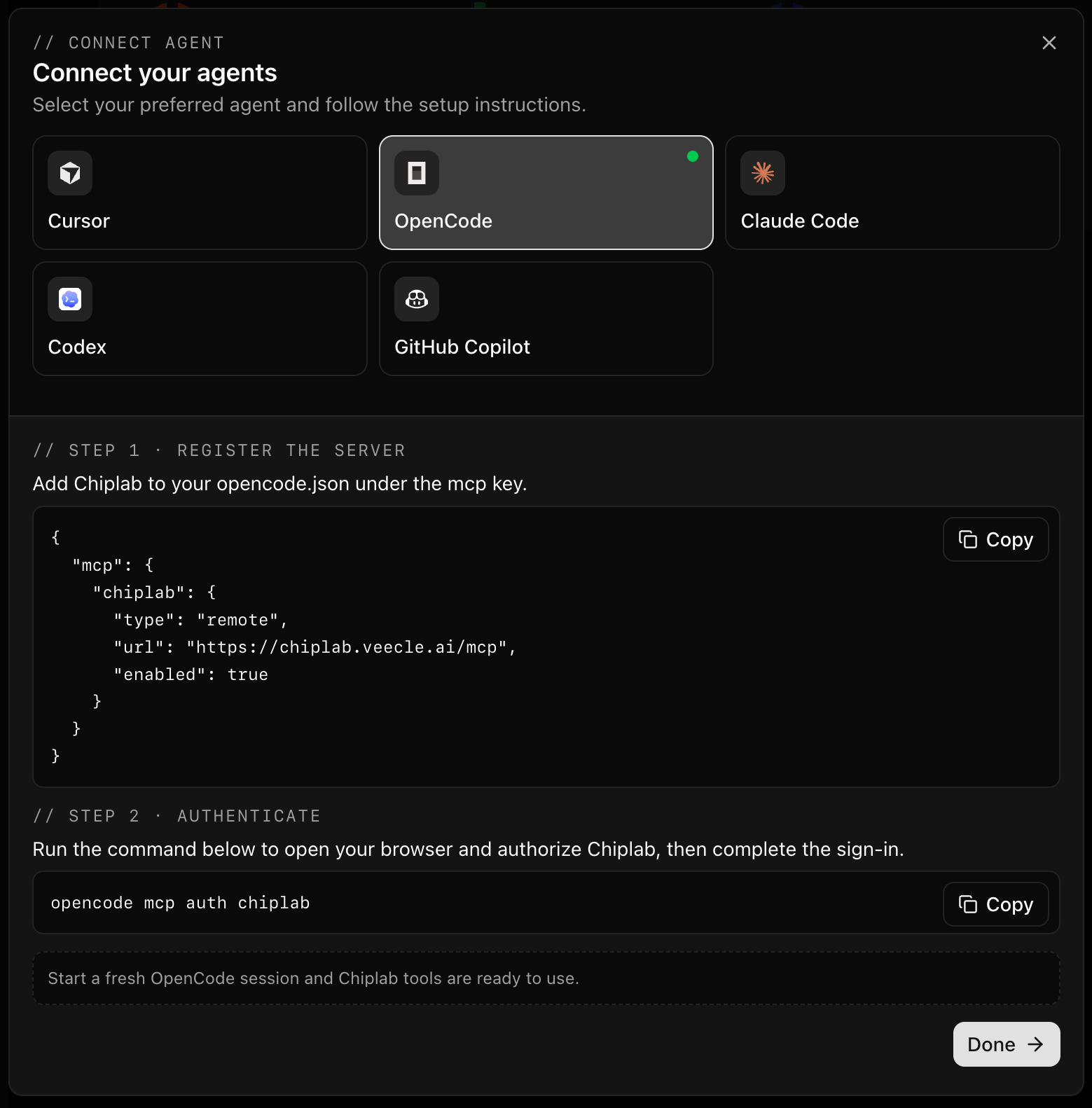
The Connect Your Agent flow, with the agent picker visible.
For OpenCode, the snippet goes into opencode.json in your project root:
{
  "mcp": {
    "chiplab": {
      "type": "remote",
      "url": "https://chiplab.veecle.ai/mcp",
      "enabled": true
    }
  }
}
Only the config file format differs between agents. Authentication is browser-based OAuth; there are no tokens to copy around:
opencode mcp auth chiplab
This opens a browser and walks you through login. One gotcha: start a fresh OpenCode session after authenticating so the agent picks up the connection. To sanity-check, call chiplab_ask with no arguments; it returns a short overview of the platform.
Step 3: Run firmware on a simulated chip
Tell your agent:
Build and run examples/bare-metal/stm32f4-discovery on Chiplab.
That's the whole prompt. Here's the session, condensed:
> Build and run examples/bare-metal/stm32f4-discovery on Chiplab.

● chiplab_ask
  Board: stm32f4-discovery, target thumbv7m-none-eabi,
  board_id stm32f4_discovery. Building.

$ cargo build --release
  Finished `release` profile [optimized] target(s) in 0.09s

● chiplab_issue_upload_ticket   → artifact_01kx…
● chiplab_run                   [artifact_01kx…, board_id=stm32f4_discovery]
● chiplab_get_task_result       → run complete
● chiplab_issue_download_ticket → stdout
The agent read the example's docs to pick the right target, built the ELF, uploaded it, and triggered the run; no step needed my input. The fetched output is the simulated chip's log, UART line included:
08:05:37.7476 [INFO] machine-0: Machine started.
08:05:37.8046 [INFO] usart2: [host: 0.19s (+0.19s)|virt: 0s (+0s)] Hello world!
08:05:42.7518 [INFO] machine-0: Machine paused.
Hello world! — as expected. The whole session, build included, took 49 seconds.
Three details worth knowing about that run:
- It's bounded by simulated CPU time, not wall-clock time. Chiplab boots the chip, executes the firmware for a fixed budget, and returns everything written to the UART.
- It's the real chip's behavior. The same ELF you'd flash onto a physical F4 Discovery runs here: same peripheral registers, same startup sequence. Firmware that misconfigures the UART clock fails on Chiplab the same way it fails on your desk.
- It's quick. A full cycle, build to captured output, comes back in under a minute.
Step 4: Port to a board you don't own
Running a known-good example is a smoke test. The porting case is the reason we built this.
The example only supports the STM32F4 Discovery. I want it on an nRF52840 DK: a different chip from a different vendor, with a different UART peripheral and its own quirks. Normally I wouldn't ship support for hardware I can't test on; this is exactly the kind of change that looks done in a PR and fails the first time it touches silicon.
So I let the agent write it and let Chiplab judge it. My prompt, in full:
Add support for the nRF52840 DK to this project and validate it on Chiplab.
No datasheets pasted in, no register names, no extra context.
The agent writes a new example crate, examples/bare-metal/nrf52840-dk-run, sets up the right Rust target (thumbv7em-none-eabihf), and builds an ELF. Then, instead of declaring victory, it uploads the binary and runs it on a simulated nRF52840 DK to find out whether it's actually correct:
$ cargo build --release
  Finished `release` profile [optimized] target(s) in 12.10s

● chiplab_issue_upload_ticket   → artifact_01kx…
● chiplab_run                   [artifact_01kx…, board_id=nrf52840_dk]
● chiplab_get_task_result       → run complete
● chiplab_issue_download_ticket → stdout

09:54:45.2894 [INFO] machine-0: Machine started.
09:54:45.3455 [WARNING] uart0: Unhandled write to offset 0x514. …
09:54:50.2938 [INFO] machine-0: Machine paused.
First attempts at a new target often fail in chip-specific ways. This one did. The board boots, the GPIO writes land, and no Hello world! appears anywhere in the capture. The firmware built cleanly and ran, but the UART transmitted nothing.
Instead of guessing, the agent asks Chiplab's knowledge base, which accumulates validated fixes and chip-specific gotchas from runs across the platform:
● chiplab_ask [query=nRF52840 UARTE0 write() called with a byte string
  literal, board boots fine, GPIO pin config warnings appear, but no bytes
  show up in the captured UART output. What's the known cause and fix?]
The answer is a classic nRF52840 gotcha: the UARTE peripheral uses EasyDMA, which can only read from RAM. The agent cross-checks the other candidates against the actual code: Uarte::write() handles the PTR/MAXCNT/STARTTX ordering internally and only UARTE0 is initialized, so those are ruled out. The one thing left under its control is where the message lives: a b"..." literal is a &'static slice placed in .rodata, in flash, which EasyDMA can't read. On real hardware that diagnosis is an afternoon with a debug probe. The fix is two lines:
-     let msg = b"Hello world!\n";
-     let _ = uarte.write(msg);
+     let msg: [u8; 13] = *b"Hello world!\n";
+     let _ = uarte.write(&msg);
The message is copied into a stack array, in RAM. Second run, same board:
09:56:08.8470 [INFO] machine-0: Machine started.
09:56:08.9105 [INFO] uart0: [host: 0.2s (+0.2s)|virt: 0s (+0s)] Hello world!
09:56:13.8512 [INFO] machine-0: Machine paused.
End to end: a working, validated implementation for a board I've never plugged in, from a one-line prompt, in about five minutes. Not "the code compiles": the code ran on the target and printed what it should.
Supported boards
Chiplab currently simulates boards from the STM32 and Nordic nRF families:
| Board | board_id |
|---|---|
| STM32F4 Discovery | stm32f4_discovery |
| STM32F7 Discovery | stm32f7_discovery |
| STM32F103 Blue Pill | stm32f103_blue_pill |
| STM32WBA52 Nucleo | stm32wba52_nucleo |
| STM32L073 Nucleo | stm32l073_nucleo |
| STM32H745 Nucleo | stm32h745_nucleo |
| nRF52840 DK | nrf52840_dk |
The up-to-date list, including which frameworks run on which board, lives in supported-boards.md. If you need a chip that isn't there, open an issue; coverage is driven by requests.
Wrapping up
One config file, one OAuth login, and your agent can build, run, and observe firmware without any hardware on your desk.
If you try it, tell us what worked, what broke, and which board you want next:
- Repo & examples: github.com/veecle/chiplab
- Discord: discord.com/invite/F6GwZJ6ktP
- Chiplab: veecle.ai/chiplab
Single runs from a local agent are the start. Next: running your embedded test suite on simulated hardware in CI, on every commit, before a prototype exists. That post is coming.