%20--%3e%3cpath%20d='M2025.4,806.8c-2.5,20.1-16.2,38.2-34.5,45.1-3.4,1.3-8.4,2.3-14.6,3.2-14.2,1.9-34.3,2.8-53.7,2.7h-.2c-23.1-.1-45.1-1.7-54.4-4.4-2.5-.7-4.9-1.6-7.2-2.7-.2,0-.3-.2-.5-.2-8.2-3.8-15.6-9.8-21.1-17.1-5.7-7.6-9.4-16.8-10-27,0,0,0,0,0,0-.5-3.1-.8-6.3-1.1-9.7-.5-7.2-.9-16.4-1-26.5h281.9c0-63.9-2.2-130.2-61.1-167.8-37.4-23.8-95.6-24.8-152.9-22.2-52.8,2.3-90.5,17.6-115.3,46.6-24.2,28.3-35.5,68.9-34.5,125.8h0c.2,12.6,1,26,2.4,40.2.3,3.1.6,6.2,1,9.4,2.9,25.9,12.9,50.3,28.9,70.4,10.9,13.8,24,24.9,38.8,32.8,7.6,4.1,15.7,7.4,24.1,9.8,17.8,5,52.5,7.8,87.8,7.8s64.2-2.2,84.5-7.1c2.9-.7,5.5-1.4,7.8-2.2,45-15,82.5-60.5,85.6-106.7h-80.6ZM2025.3,709.9h-198.3v-2.6c0-33.2,26.7-58.2,64.8-58.2h72.8c30.3,0,60.8,24.9,60.8,58.2v2.6Z'/%3e%3cpath%20d='M1620.8,806.8c-2.5,20.1-16.2,38.2-34.5,45.1-3.4,1.3-8.4,2.3-14.6,3.2-14.2,1.9-34.3,2.8-53.7,2.7h-.2c-23.1-.1-45.1-1.7-54.4-4.4-2.5-.7-4.9-1.6-7.2-2.7-.2,0-.3-.2-.5-.2-8.2-3.8-15.6-9.8-21.1-17.1-5.7-7.6-9.4-16.8-10-27,0,0,0,0,0,0-.5-3.1-.8-6.3-1.1-9.7-.5-7.2-.9-16.4-1-26.5h281.9c0-63.9-2.2-130.2-61.1-167.8-37.4-23.8-95.6-24.8-152.9-22.2-52.8,2.3-90.5,17.6-115.3,46.6-24.2,28.3-35.5,68.9-34.5,125.8h0c.2,12.6,1,26,2.4,40.2.3,3.1.6,6.2,1,9.4,2.9,25.9,12.9,50.3,28.9,70.4,10.9,13.8,24,24.9,38.8,32.8,7.6,4.1,15.7,7.4,24.1,9.8,17.8,5,52.5,7.8,87.8,7.8s64.2-2.2,84.5-7.1c2.9-.7,5.5-1.4,7.8-2.2,45-15,82.5-60.5,85.6-106.7h-80.6ZM1620.8,709.9h-198.3v-2.6c0-33.2,26.7-58.2,64.8-58.2h72.8c30.3,0,60.8,24.9,60.8,58.2v2.6Z'/%3e%3cpath%20d='M2968.1,806.8c-2.5,20.1-16.2,38.2-34.5,45.1-3.4,1.3-8.4,2.3-14.6,3.2-14.2,1.9-34.3,2.8-53.7,2.7h-.2c-23.1-.1-45.1-1.7-54.4-4.4-2.5-.7-4.9-1.6-7.2-2.7-.2,0-.3-.2-.5-.2-8.2-3.8-15.6-9.8-21.1-17.1-5.7-7.6-9.4-16.8-10-27,0,0,0,0,0,0-.5-3.1-.8-6.3-1.1-9.7-.5-7.2-.9-16.4-1-26.5h281.9c0-63.9-2.2-130.2-61.1-167.8-37.4-23.8-95.6-24.8-152.9-22.2-52.8,2.3-90.5,17.6-115.3,46.6-24.2,28.3-35.5,68.9-34.5,125.8h0c.2,12.6,1,26,2.4,40.2.3,3.1.6,6.2,1,9.4,2.9,25.9,12.9,50.3,28.9,70.4,10.9,13.8,24,24.9,38.8,32.8,7.6,4.1,15.7,7.4,24.1,9.8,17.8,5,52.5,7.8,87.8,7.8s64.2-2.2,84.5-7.1c2.9-.7,5.5-1.4,7.8-2.2,45-15,82.5-60.5,85.6-106.7h-80.6ZM2968,709.9h-198.3v-2.6c0-33.2,26.7-58.2,64.8-58.2h72.8c30.3,0,60.8,24.9,60.8,58.2v2.6Z'/%3e%3cpath%20d='M2402,586.8c-33.3-9.5-98.1-9.6-133.7-3.3-28.1,4.9-55.3,19.7-76.7,41.5-21.4,21.8-35.7,49.3-40.3,77.5-10.8,65.9,0,123.9,30.3,163.2,24.8,32.1,61.3,50.7,108.4,55.2,14.2,1.3,27.5,2,40.1,2,30.6,0,56.9-4,79.6-12,39.8-14,69.4-40,86-79.2,8.9-20.9,11.3-36.7,11.3-59.5v-1h-78.2s1.1,63.5-43.7,75.9c-26.4,6.3-75.2,4-98.6,2.3-17.8-1.3-31.6-7.1-41-17.3-9-9.8-14.2-24-15.4-42.1-1.9-28.8-2.6-90.3,7.3-109.2,7.1-13.5,21.4-23.8,37.3-27,23-4.5,98.1-4.2,117.7,3.4,37.1,14.4,36.3,55.9,36.3,55.9h78.2v-2c0-26.6-10.5-55.1-31.4-78.7-19.5-21.9-47-37.8-73.7-45.4Z'/%3e%3crect%20x='2557.8'%20y='492.7'%20width='80.1'%20height='422.1'/%3e%3cpolygon%20points='1119.3%20831.5%201007.4%20585.6%20913.1%20585.6%201065%20913.6%201065.5%20914.8%201173%20914.8%201325.4%20585.6%201231.2%20585.6%201119.3%20831.5'/%3e%3cpolygon%20points='265%20601.6%20265%20810.4%20627.6%201019.1%20627.6%201019.1%20627.6%201019.1%20627.6%201019.1%20627.6%201019.1%20808.9%20914.8%20808.9%20706%20627.6%20810.4%20265%20601.6'/%3e%3cpolygon%20points='808.9%20706%20808.9%20497.2%20627.6%20601.5%20808.9%20706'/%3e%3c/svg%3e)
Renode vs QEMU for firmware development: what each actually models
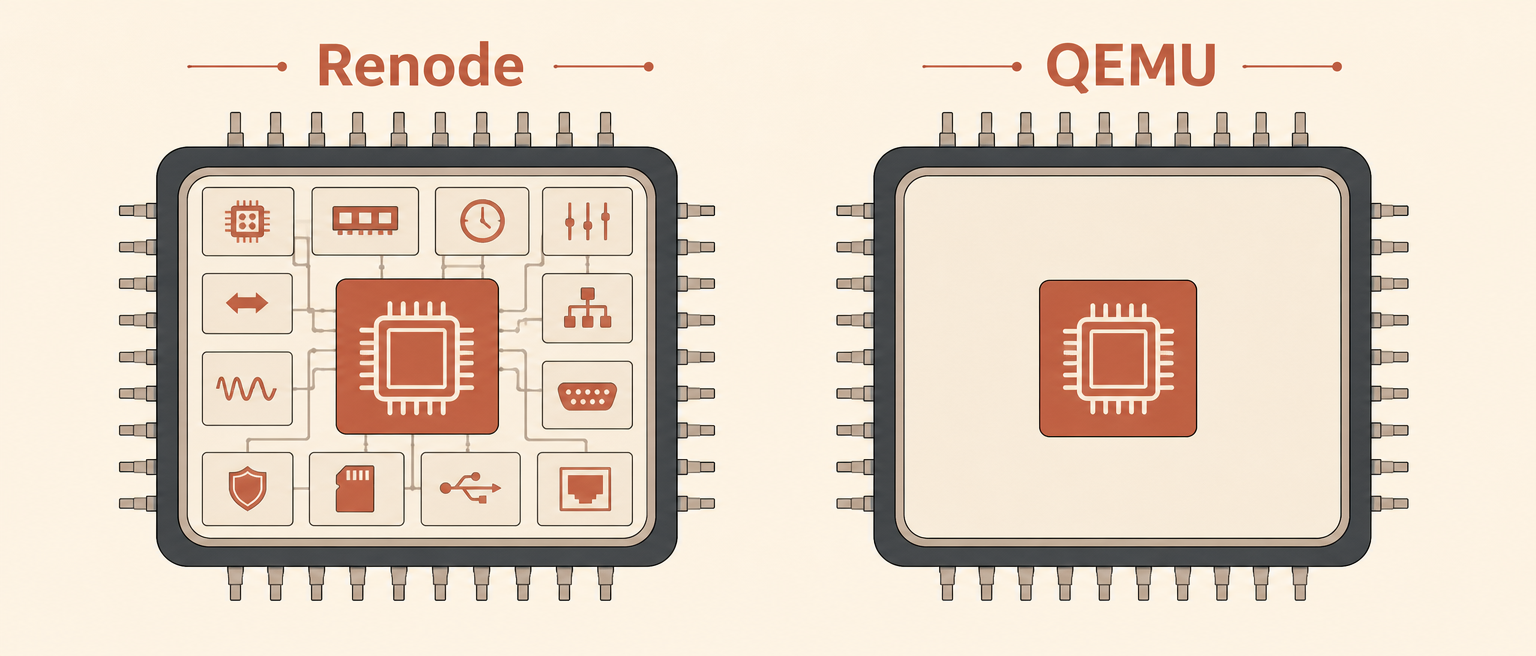
You can run the same firmware binary on Renode and QEMU and get different results. Not because one is broken. Because they're simulating different machines.
I've already run the exact same STM32 firmware on both and watched the results diverge. This is the other half: a Renode vs QEMU comparison of what each tool actually models, so you know why they diverge before you ever hit run.
Both are called "emulators" and both handle Cortex-M simulation. But Renode is a platform-description simulator, and QEMU is a full-system emulator—a distinction that shapes everything else.
The machine definition problem
Both bill themselves as STM32 emulators, but only one lets you edit the board underneath it.
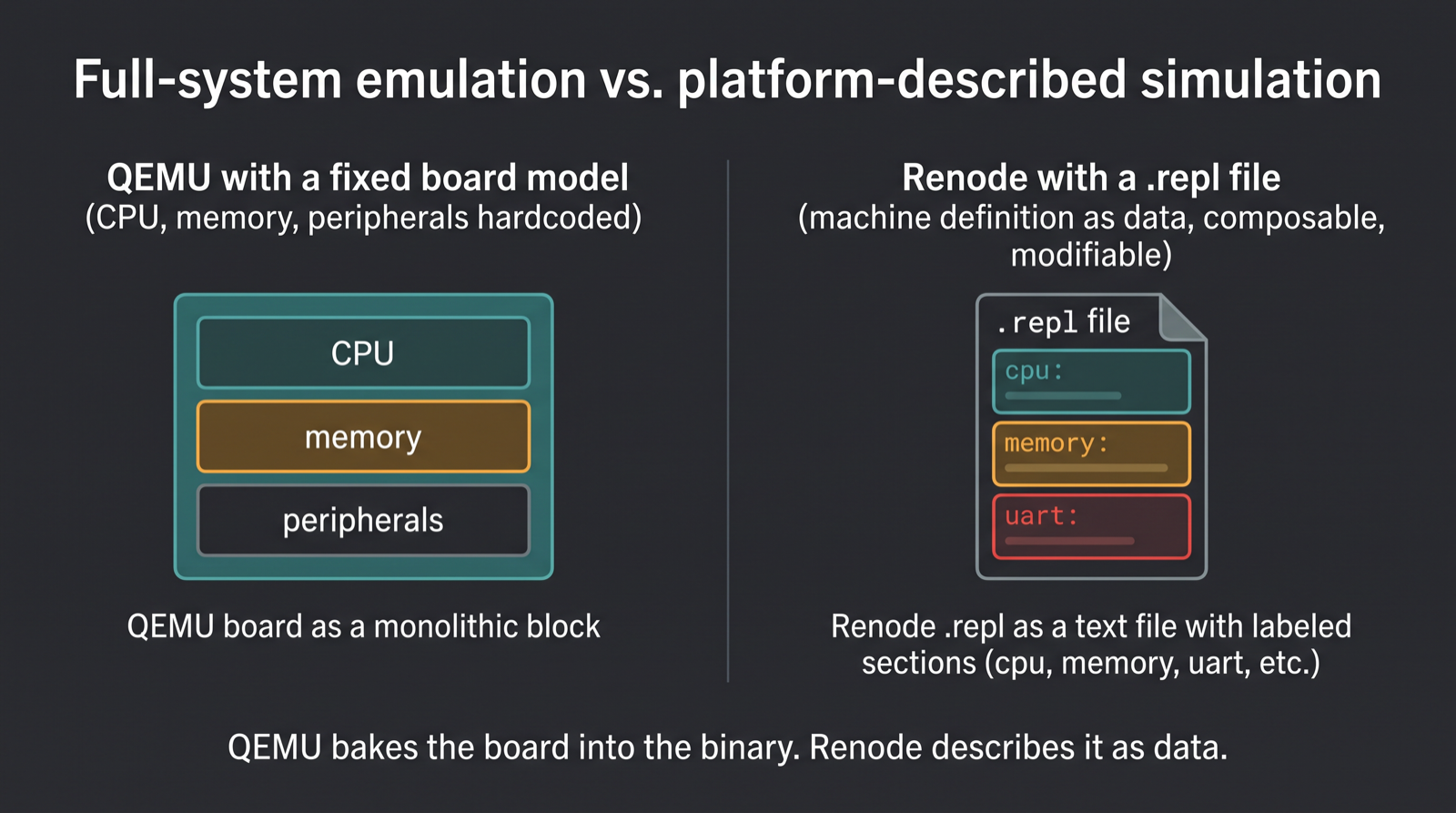
QEMU ships a compiled-in set of board models.1 You pick one:
qemu-system-arm -M stm32vldiscovery. That board is hardcoded. The CPU, the memory map, the
peripherals, the interrupt routing—all baked in. You can't change it
without recompiling QEMU.
Renode ships with .repl files—platform description files written in a
YAML-like syntax. A .repl file is a machine definition. You can load
one, modify it, compose it with others, or write your own. The STM32F4
Discovery board in Renode is not a fixed model; it's a description you
can read and edit.2
This matters because real hardware is messy. The STM32F4 Discovery has
CCM (core-coupled memory) at 0x10000000. The standard platform
description might not include it. In Renode, you add it with four
lines:
ccm: Memory.MappedMemory @ sysbus 0x10000000
    size: 0x10000
In QEMU, you're stuck. The fixed board model doesn't include CCM, and
there's no config knob to add it: extending the memory map means patching
QEMU's board source and recompiling. Your firmware's write to
0x10000000 hits an address the model never accounted for, and what
happens next depends on how that specific board wires up its unmapped
space, not on anything you control.
Peripheral fidelity: the honest gap
Both model peripherals, but neither models them completely. Renode's approach is explicit. A peripheral in Renode is a C# object that implements a register interface. You can write custom peripherals in C# or Python. The UART peripheral, for example, accepts writes to the transmit register and emits bytes. It doesn't model baud rate, clock gating, or pin multiplexing. It's byte-level. That's documented.3
QEMU's peripherals are C code. They're often more detailed—QEMU's UART can model baud rates and clock divisors. But the detail is inconsistent. Some boards have rich peripheral models; others have stubs. And the documentation of what's actually modeled versus what's faked is scattered across source code comments.
Neither models the analog side. A real STM32 ADC has noise, settling time, and reference voltage behavior; both simulators give clean digital reads. A real UART has timing jitter and electrical characteristics; both give perfect bytes. A real SPI bus has clock skew and signal integrity; both give bit-perfect transfers.
This is fine if you're testing firmware logic. It's a problem if you're validating timing-critical code or debugging electrical issues.
Timing models: where they diverge most
QEMU's developers are explicit: this isn't cycle-accurate emulation. TCG's icount feature tracks instruction counts for deterministic replay, but the docs say plainly: "This should not be confused with cycle accurate emulation - QEMU does not attempt to emulate how long an instruction would take on real hardware."4 By default, QEMU clocks run on wall time, same as any other process on your machine.
Renode doesn't claim cycle accuracy either. Its time framework advances virtual time from a configured MIPS rate: tell it the core runs at 100 MIPS and one virtual microsecond covers 100 instructions, no pipeline or cache modeling involved.5 It can also run flat out, letting simulated time race ahead of wall-clock time, useful for tests that only care about ordering, not absolute duration.
Neither tool measures cycles. Both approximate timing from instruction counts—a real limit worth understanding on its own terms. We cover what "cycle-accurate" actually requires, and which firmware bugs genuinely need it, in a separate piece.
Multi-machine and networking
Renode was built for multi-node simulation. You can create ten virtual boards in one session, connect them with virtual networks, and test distributed firmware. This is native to Renode's architecture.
QEMU can run multiple instances, but they're separate processes. Networking between them requires external setup (tap devices, bridges, etc.). It's possible but not the intended use case.
If you're testing a mesh network or a multi-device protocol, Renode is the obvious choice. If you're testing a single board, it doesn't matter.
Debugging integration
Both support GDB. Renode exposes a GDB server on a port; you connect
with arm-none-eabi-gdb and debug as if the board were on your desk.
QEMU does the same.
Renode also has an official VS Code extension for spawning and controlling simulations from inside the editor,6 plus a built-in monitor with commands for introspection: log function calls, trace register writes, inspect memory, inject faults. The monitor is powerful for embedded work.
QEMU's debugging is more minimal. You get GDB and the QEMU monitor (which is different from Renode's). For low-level debugging, Renode wins. For basic breakpoint-and-step work, both are fine.
CI/CD and automation
Renode was designed for CI. You write .resc scripts (Renode scripts)
that set up a machine, load firmware, run tests, and exit. These
integrate cleanly with Jenkins, GitLab CI, GitHub Actions. The Robot
Framework integration lets you write test suites in a readable syntax.
QEMU is scriptable via the monitor, but it's less ergonomic. You typically wrap QEMU in shell scripts or Python. It works, but it's more boilerplate.
For automated testing in a pipeline, Renode is the better fit.
If you're weighing the whole ladder of firmware simulators, not just this pair, that's the territory covered in Wokwi alternatives for professional firmware work.
Extensibility and customization
Renode lets you write custom peripherals in C# or Python. You can model a sensor, a radio, a custom ASIC—anything that reads and writes registers. The platform description format is composable; you can build complex boards from simpler pieces.
QEMU requires C code for custom peripherals. You modify QEMU's source, recompile, and test. It's more powerful but much higher friction.
If you need to simulate a custom peripheral or a board that doesn't exist in either tool, Renode is more accessible.
The Renode vs QEMU comparison table
| Dimension | Renode | QEMU |
|---|---|---|
| Machine definitions | Composable .repl files; easy to modify and extend | Fixed board models; hardcoded in source |
| Supported Cortex-M boards | Broad and community-extensible: STM32 (F0-H7), nRF, LPC, Kinetis, and more | A short, fixed list: a handful of STM32 variants, plus Stellaris and MPS2/3 test chips7 |
| Peripheral modeling | Byte-level; extensible via C# or Python | Instruction-level; C code; inconsistent detail |
| Timing model | Instruction-count based (configurable MIPS rate); can run as-fast-as-possible5 | Wall-clock by default; optional instruction counting (icount) for determinism, not cycle timing4 |
| Multi-node simulation | Native; designed for it | Possible via separate processes; not native |
| Debugging | GDB + IDE integration + monitor + function tracing | GDB + QEMU monitor |
| CI/CD integration | Native; .resc scripts + Robot Framework | Via shell scripting; more boilerplate |
| Extensibility | Custom peripherals in C# or Python | Custom peripherals in C; requires recompile |
| What it silently lies about | Analog behavior, clock gating, pin routing, electrical timing | Same, plus inconsistent peripheral detail across boards |
| License | MIT (open-source)8 | GPL/LGPL (open-source) |
Where each one wins
Use Renode if:
- You're testing Cortex-M firmware and need to iterate on the board definition.
- You're running automated tests in CI and want readable, maintainable test scripts.
- You need to simulate multiple boards talking to each other.
- You're modeling a custom peripheral or a board that doesn't exist in QEMU.
- You want to trace function calls, inspect register writes, or debug at the firmware level.
Use QEMU if:
- You're testing embedded Linux on ARM (QEMU is the standard for this).
- You need deterministic, replayable execution for debugging (QEMU's
icount/ record-replay).4 - You're already in a QEMU workflow and the board model exists.
- You're comfortable with shell scripting for test automation.
Use both if:
- You're serious about firmware validation. Run the same test on both and compare results. If they differ, you've found a gap in one tool's model.
Can QEMU emulate an STM32F4 Discovery board?
Not directly. QEMU's Cortex-M support for STM32 is a short, fixed list
of boards: stm32vldiscovery, netduino2, netduinoplus2,
olimex-stm32-h405, and a couple of others, and none of them is an F407
Discovery board.7 The closest match is netduinoplus2, which models
an STM32F405, a related chip with a different peripheral map, not the
same board. We ran an F407 binary against it
anyway and watched it hit a
fatal, unescalatable fault before printing a single byte, on firmware
that boots clean on Renode's exact stm32f4_discovery machine.
The honest part
Neither tool is a substitute for hardware. Firmware that compiles, runs, and produces output in simulation can still fail on real silicon. The UART might be wired to the wrong pin. The ADC might see noise on the bench. Timing might miss deadlines under load.
The value of simulation isn't that it's accurate. It's that it's fast and repeatable. You catch the obvious bugs—the logic errors, the state machine hangs, the missing initialization—before you touch hardware. Then you use hardware for the things simulation can't do: verify timing under real load, check electrical behavior, validate power consumption, and sign off on the final binary.
Renode and QEMU are both good at the simulation part. They just model different things. Pick the one that matches your board and your workflow. And when the simulation says "it works," remember: that's the beginning of validation, not the end.
Sources
Footnotes
-
QEMU Arm System Emulator. https://www.qemu.org/docs/master/system/target-arm.html ↩
-
Renode Platform Description Format. https://renode.readthedocs.io/en/latest/advanced/platform_description_format.html ↩
-
Baldassari, François. "Cortex-M MCU Emulation with Renode." Interrupt by Memfault, March 23, 2020. https://interrupt.memfault.com/blog/intro-to-renode ↩
-
QEMU, "TCG Instruction Counting." QEMU documentation. https://www.qemu.org/docs/master/devel/tcg-icount.html ↩ ↩2 ↩3
-
Renode Time Framework. https://renode.readthedocs.io/en/latest/advanced/time_framework.html ↩ ↩2
-
Antmicro. "Testing and debugging embedded systems in simulation with Renode VS Code extension." https://antmicro.com/blog/2024/12/introducing-renode-vscode-extension ↩
-
QEMU, "STMicroelectronics STM32 boards." QEMU documentation. https://www.qemu.org/docs/master/system/arm/stm32.html ↩ ↩2
-
Renode, LICENSE file (MIT license). https://github.com/renode/renode/blob/master/LICENSE ↩