%20--%3e%3cpath%20d='M2025.4,806.8c-2.5,20.1-16.2,38.2-34.5,45.1-3.4,1.3-8.4,2.3-14.6,3.2-14.2,1.9-34.3,2.8-53.7,2.7h-.2c-23.1-.1-45.1-1.7-54.4-4.4-2.5-.7-4.9-1.6-7.2-2.7-.2,0-.3-.2-.5-.2-8.2-3.8-15.6-9.8-21.1-17.1-5.7-7.6-9.4-16.8-10-27,0,0,0,0,0,0-.5-3.1-.8-6.3-1.1-9.7-.5-7.2-.9-16.4-1-26.5h281.9c0-63.9-2.2-130.2-61.1-167.8-37.4-23.8-95.6-24.8-152.9-22.2-52.8,2.3-90.5,17.6-115.3,46.6-24.2,28.3-35.5,68.9-34.5,125.8h0c.2,12.6,1,26,2.4,40.2.3,3.1.6,6.2,1,9.4,2.9,25.9,12.9,50.3,28.9,70.4,10.9,13.8,24,24.9,38.8,32.8,7.6,4.1,15.7,7.4,24.1,9.8,17.8,5,52.5,7.8,87.8,7.8s64.2-2.2,84.5-7.1c2.9-.7,5.5-1.4,7.8-2.2,45-15,82.5-60.5,85.6-106.7h-80.6ZM2025.3,709.9h-198.3v-2.6c0-33.2,26.7-58.2,64.8-58.2h72.8c30.3,0,60.8,24.9,60.8,58.2v2.6Z'/%3e%3cpath%20d='M1620.8,806.8c-2.5,20.1-16.2,38.2-34.5,45.1-3.4,1.3-8.4,2.3-14.6,3.2-14.2,1.9-34.3,2.8-53.7,2.7h-.2c-23.1-.1-45.1-1.7-54.4-4.4-2.5-.7-4.9-1.6-7.2-2.7-.2,0-.3-.2-.5-.2-8.2-3.8-15.6-9.8-21.1-17.1-5.7-7.6-9.4-16.8-10-27,0,0,0,0,0,0-.5-3.1-.8-6.3-1.1-9.7-.5-7.2-.9-16.4-1-26.5h281.9c0-63.9-2.2-130.2-61.1-167.8-37.4-23.8-95.6-24.8-152.9-22.2-52.8,2.3-90.5,17.6-115.3,46.6-24.2,28.3-35.5,68.9-34.5,125.8h0c.2,12.6,1,26,2.4,40.2.3,3.1.6,6.2,1,9.4,2.9,25.9,12.9,50.3,28.9,70.4,10.9,13.8,24,24.9,38.8,32.8,7.6,4.1,15.7,7.4,24.1,9.8,17.8,5,52.5,7.8,87.8,7.8s64.2-2.2,84.5-7.1c2.9-.7,5.5-1.4,7.8-2.2,45-15,82.5-60.5,85.6-106.7h-80.6ZM1620.8,709.9h-198.3v-2.6c0-33.2,26.7-58.2,64.8-58.2h72.8c30.3,0,60.8,24.9,60.8,58.2v2.6Z'/%3e%3cpath%20d='M2968.1,806.8c-2.5,20.1-16.2,38.2-34.5,45.1-3.4,1.3-8.4,2.3-14.6,3.2-14.2,1.9-34.3,2.8-53.7,2.7h-.2c-23.1-.1-45.1-1.7-54.4-4.4-2.5-.7-4.9-1.6-7.2-2.7-.2,0-.3-.2-.5-.2-8.2-3.8-15.6-9.8-21.1-17.1-5.7-7.6-9.4-16.8-10-27,0,0,0,0,0,0-.5-3.1-.8-6.3-1.1-9.7-.5-7.2-.9-16.4-1-26.5h281.9c0-63.9-2.2-130.2-61.1-167.8-37.4-23.8-95.6-24.8-152.9-22.2-52.8,2.3-90.5,17.6-115.3,46.6-24.2,28.3-35.5,68.9-34.5,125.8h0c.2,12.6,1,26,2.4,40.2.3,3.1.6,6.2,1,9.4,2.9,25.9,12.9,50.3,28.9,70.4,10.9,13.8,24,24.9,38.8,32.8,7.6,4.1,15.7,7.4,24.1,9.8,17.8,5,52.5,7.8,87.8,7.8s64.2-2.2,84.5-7.1c2.9-.7,5.5-1.4,7.8-2.2,45-15,82.5-60.5,85.6-106.7h-80.6ZM2968,709.9h-198.3v-2.6c0-33.2,26.7-58.2,64.8-58.2h72.8c30.3,0,60.8,24.9,60.8,58.2v2.6Z'/%3e%3cpath%20d='M2402,586.8c-33.3-9.5-98.1-9.6-133.7-3.3-28.1,4.9-55.3,19.7-76.7,41.5-21.4,21.8-35.7,49.3-40.3,77.5-10.8,65.9,0,123.9,30.3,163.2,24.8,32.1,61.3,50.7,108.4,55.2,14.2,1.3,27.5,2,40.1,2,30.6,0,56.9-4,79.6-12,39.8-14,69.4-40,86-79.2,8.9-20.9,11.3-36.7,11.3-59.5v-1h-78.2s1.1,63.5-43.7,75.9c-26.4,6.3-75.2,4-98.6,2.3-17.8-1.3-31.6-7.1-41-17.3-9-9.8-14.2-24-15.4-42.1-1.9-28.8-2.6-90.3,7.3-109.2,7.1-13.5,21.4-23.8,37.3-27,23-4.5,98.1-4.2,117.7,3.4,37.1,14.4,36.3,55.9,36.3,55.9h78.2v-2c0-26.6-10.5-55.1-31.4-78.7-19.5-21.9-47-37.8-73.7-45.4Z'/%3e%3crect%20x='2557.8'%20y='492.7'%20width='80.1'%20height='422.1'/%3e%3cpolygon%20points='1119.3%20831.5%201007.4%20585.6%20913.1%20585.6%201065%20913.6%201065.5%20914.8%201173%20914.8%201325.4%20585.6%201231.2%20585.6%201119.3%20831.5'/%3e%3cpolygon%20points='265%20601.6%20265%20810.4%20627.6%201019.1%20627.6%201019.1%20627.6%201019.1%20627.6%201019.1%20627.6%201019.1%20808.9%20914.8%20808.9%20706%20627.6%20810.4%20265%20601.6'/%3e%3cpolygon%20points='808.9%20706%20808.9%20497.2%20627.6%20601.5%20808.9%20706'/%3e%3c/svg%3e)
QEMU for Cortex-M: what works, what doesn't, and why
Same ELF, same md5. Renode booted it, ran it, printed over UART, and exited clean. QEMU
Cortex-M emulation killed it in one instruction. It printed qemu: fatal: Lockup: can't escalate 3 to HardFault (current priority -1), then a register dump:
qemu: fatal: Lockup: can't escalate 3 to HardFault (current priority -1)
QEMU was right. Renode was wrong. That is the whole post, and it is not the conclusion most people expect, because QEMU is the simulator almost nobody reaches for on Cortex-M.
Why QEMU locked up before main
The firmware is the bare-metal/stm32f4-discovery example from Veecle's own examples
repo. Rust, #![no_std], cortex-m-rt, built with cargo build --release, which printed
Finished and gave no warnings. QEMU has no STM32F4 Discovery machine, so the run used
the closest thing it ships: netduinoplus2, an STM32F405 board.
$ qemu-system-arm -machine netduinoplus2 -cpu cortex-m4 \
    -kernel hello-stm32f4-discovery -nographic -serial mon:stdio

qemu: fatal: Lockup: can't escalate 3 to HardFault (current priority -1)

R00=00000000 R01=00000000 R02=00000000 R03=00000000
R12=00000000 R13=2002ffe0 R14=fffffff9 R15=0800359c
XPSR=41000003 -Z-- T handler
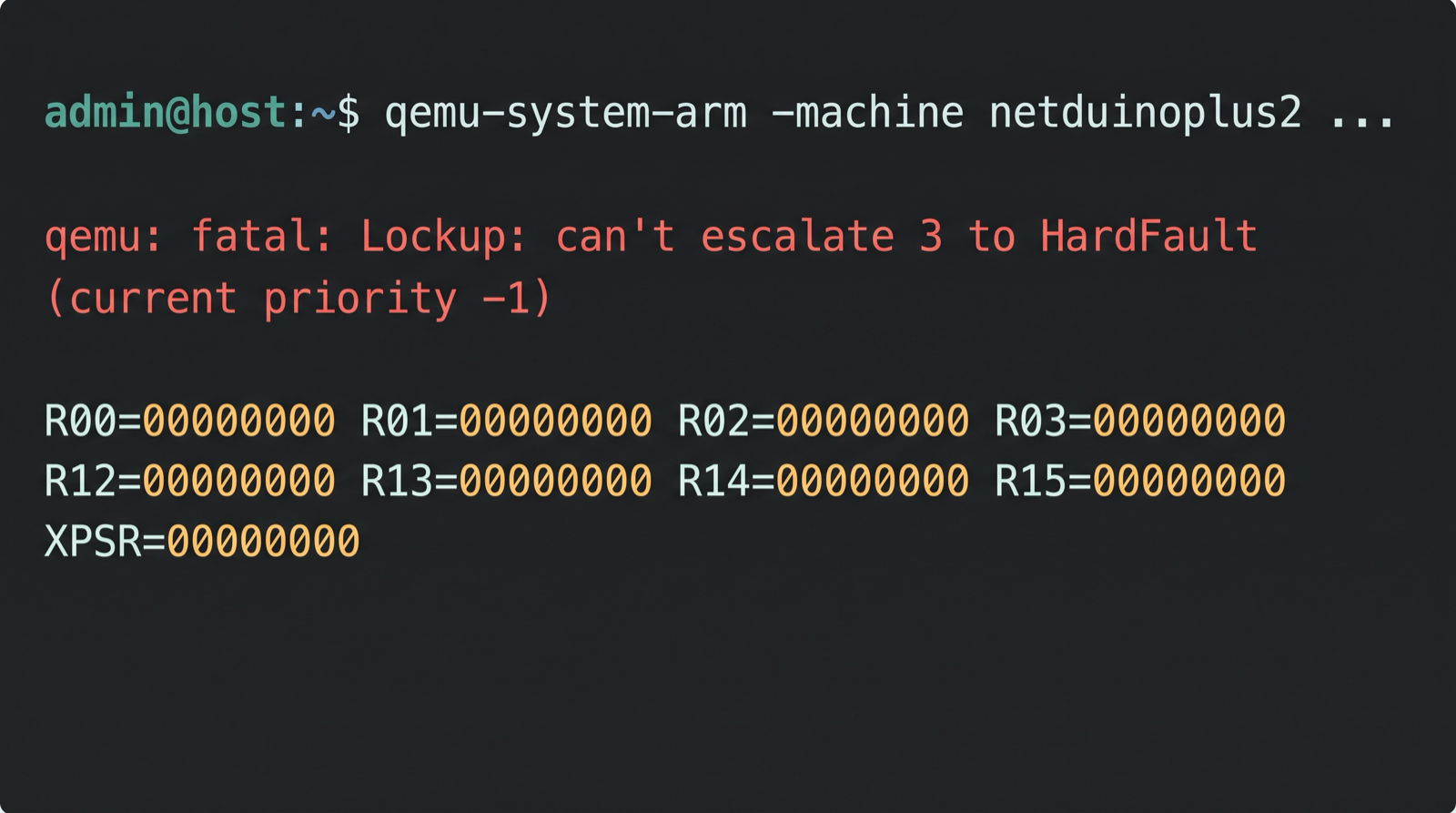
Six lines of output. No UART banner. Nothing from main. Here is what happened, and every
step is a real Cortex-M rule.
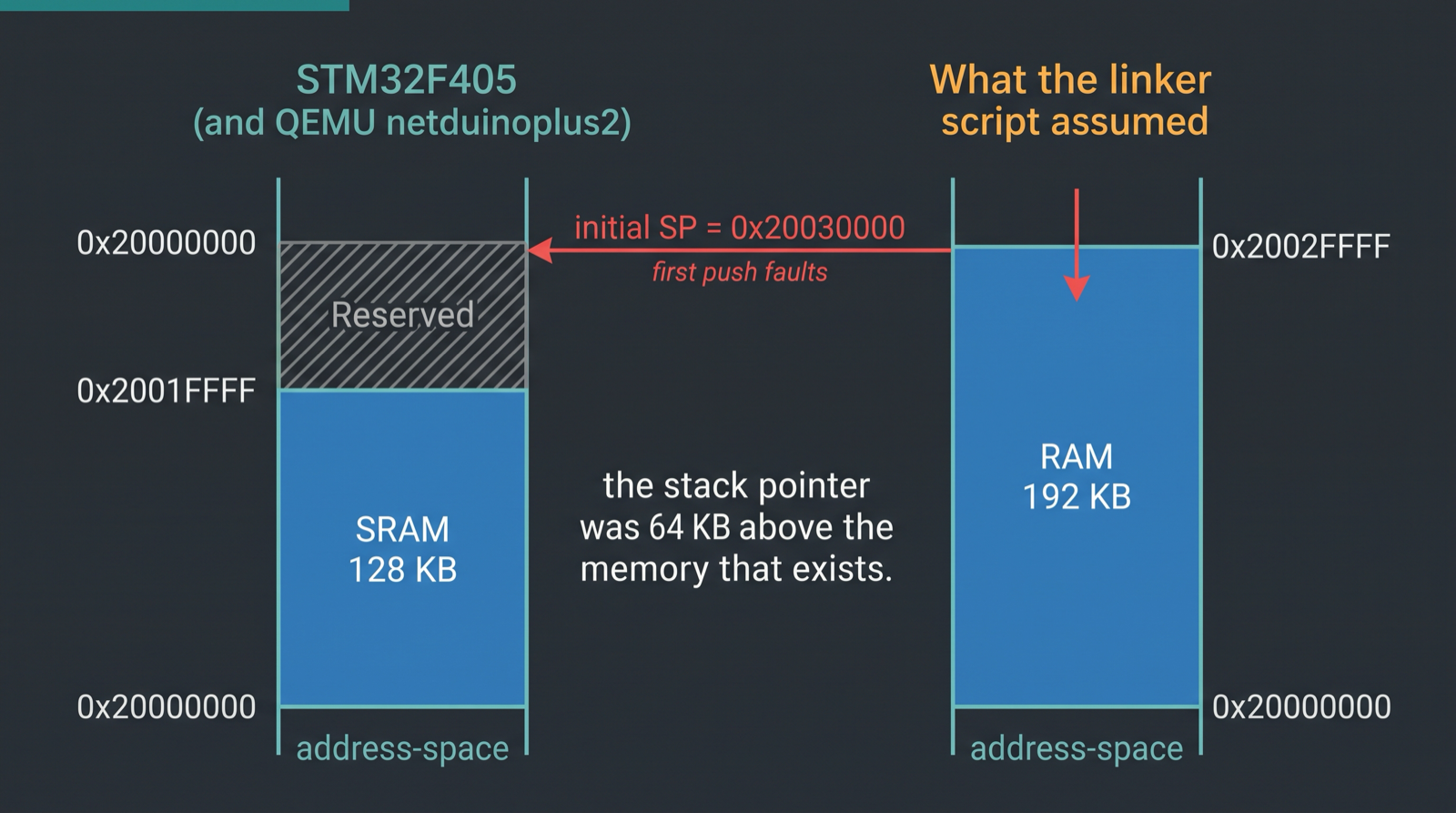
The board's linker script declares RAM : ORIGIN = 0x20000000, LENGTH = 192K.
cortex-m-rt puts the initial stack pointer at the top of RAM, so the first word of the
vector table is 0x20030000. QEMU's netduinoplus2 models an STM32F405, which has 128 KB
of contiguous SRAM at 0x20000000 and reserved space above it — which is exactly what the
silicon does.1
So the very first stack push lands in unmapped memory. R13=2002ffe0 is the register dump
telling you so: the stack pointer has decremented off the top of nothing. That raises a
fault, and the CPU enters the HardFault handler. Whose own first instruction is:
0800359c <HardFault_>:
 800359c:	b580      	push	{r7, lr}
 800359e:	466f      	mov	r7, sp
 80035a0:	e7fe      	b.n	80035a0 <HardFault_+0x4>
R15=0800359c is that first push. R14=fffffff9 is an EXC_RETURN value, confirming the
core was already in handler mode. The prologue push faults for the same reason the first
one did, and a fault taken inside HardFault at priority -1 is lockup by definition. Dead
before main, in about two instructions, with no diagnostic beyond a register dump.
The same ELF on Chiplab's Renode-backed stm32f4_discovery board wrote and read back
0xC0FFEE01 at every one of those addresses, including the one the stack pointer sits on:
== ram boundary probe: linker claims 192k at 0x20000000 ==
initial_sp_from_vector_table=0x20030000
addr=0x2001fffc name=sram2_last_word_128k   wrote=0xc0ffee01 read=0xc0ffee01 ram_here=yes
addr=0x20020000 name=just_past_128k         wrote=0xc0ffee01 read=0xc0ffee01 ram_here=yes
addr=0x20030000 name=past_192k_claim        wrote=0xc0ffee01 read=0xc0ffee01 ram_here=yes
...
== probe complete, no fault taken ==
Three machines, one binary:
| Result | Why | |
|---|---|---|
Chiplab (Renode 1.16.1), stm32f4_discovery | boots, runs, prints, exits clean | its platform provides exactly 256 KB contiguous at 0x20000000 |
QEMU 11.0.3, netduinoplus2 (STM32F405) | instant lockup before main | provides the silicon-correct 128 KB |
| Real STM32F407 | would bus-fault on the same push | 0x20020000+ is reserved per DS86261 |
The linker script is wrong. It looks copied from an STM32F42x, which really does have a
third SRAM bank at 0x20020000. We shipped it in a public examples repo and the friendly
simulator hid it from us for months. Same gap as Renode not modeling Cortex-M fault
escalation, from the other side — and this time it
cost us a real bug.
What QEMU Cortex-M support actually covers
QEMU's Arm CPU emulation is not the weak part. TCG supports Armv6-M, Armv7-M, Armv8-M and Armv8.1-M, plus the FP, MPU, Security and System Timer extensions.2 The M-profile core is in good shape.
The boards are the gap. Here is the full STM32 machine list from qemu-system-arm -machine help on QEMU 11.0.3 — five machines, and none of them is an F4 Discovery:
b-l475e-iot01a       B-L475E-IOT01A Discovery Kit (Cortex-M4)
netduino2            Netduino 2 Machine (Cortex-M3)
netduinoplus2        Netduino Plus 2 Machine (Cortex-M4)
olimex-stm32-h405    Olimex STM32-H405 (Cortex-M4)
stm32vldiscovery     ST STM32VLDISCOVERY (Cortex-M3)
Two of the five are the same chip: netduinoplus2 and olimex-stm32-h405 are both
STM32F405RGT6. QEMU's own documentation says plainly: "There are many other STM32 series
that are currently not supported by QEMU."3
Peripheral coverage inside those machines is thin too. QEMU documents supported devices for its STM32 boards as ADC, EXTI, USART, SPI, SYSCFG, TIMER, and RCC (F4 only, reset and enable only). The missing list, also from QEMU's docs, includes DMA, GPIO, I2C, RTC, CRC, DAC, Ethernet, the Flash Interface Unit, USB OTG, and both watchdogs.3 No GPIO controller means you cannot blink an LED. Not a criticism — a published fact to plan around. Post 08 goes device-by-device on what Renode and QEMU each model.
Why the MCU story is thin, structurally
This is not neglect. It falls out of how QEMU is built and what it is for.
QEMU's center of gravity is full-system virtualization of application processors. Its Arm
docs say it supports "nearly fifty different machines" and immediately add that "even with
fifty boards QEMU does not cover more than a small fraction of the Arm hardware
ecosystem," with the recommendation that if you just want to run Linux you should use the
synthetic virt board rather than any real hardware model.4 That advice is perfect for
a kernel developer and useless for someone debugging an I2C driver.
Board models are contributed per-machine, by whoever needed them. Nobody needed an F4 Discovery badly enough to write and maintain one. QEMU is honest about the consequence: "If it is not listed, then unfortunately your image will almost certainly not boot on QEMU."4
And QEMU makes no timing claims at all. Its icount feature counts instructions, and the
docs are explicit that this "should not be confused with cycle accurate emulation - QEMU
does not attempt to emulate how long an instruction would take on real hardware. That is a
job for other more detailed (and slower) tools."5 If you need to know whether your
control loop closes in time, QEMU is the wrong instrument and says so on the tin.
What QEMU is good at here
- The CPU model. Mature, wide M-profile coverage, actively maintained.2
- gdbstub.
-s -Sgives you a remote gdb target that lets you "debug guest code in the same way that you might with a low-level debug facility like JTAG on real hardware."6 No probe, no wiring. - Semihosting. Including the trick where test code exits and reports its own pass/fail status through a semihosting call — QEMU's own test suite uses it.7
- The Arm reference machines.
mps2-an385throughmps2-an521,musca-a,musca-b1, andmicrobit. These are the well-covered ones, because they are Arm's own platforms rather than vendor silicon. - CI ubiquity. Zephyr ships
qemu_cortex_m3as a first-class board, emulating the TI LM3S6965, with a disclaimer I wish more simulators printed: "This board configuration makes no claims about its suitability for use with an actual ti_lm3s6965 hardware system, or any other hardware system."8 It is an execution environment for tests, not a stand-in for a board. - It is everywhere. One
brew installorapt install, no license server, no signup.
So what do you reach for instead?
Depends on the job. There's no single winner.
| If you need | Reach for | Caveat |
|---|---|---|
| Your exact vendor board, peripherals, multi-node | Renode | no cycle accuracy; fault escalation gaps |
| Arm reference IP, Corstone, TrustZone bring-up | Arm FVP / Virtual Hardware | functionally accurate, not cycle-accurate9 |
| One vendor's silicon, deep fidelity | That vendor's own simulator | locks you to the vendor |
| Hobby-tier wiring and a blinking LED in a browser | Wokwi | not a CI target |
| Arch-level test execution, gdb, semihosting | QEMU | board coverage is the bottleneck |
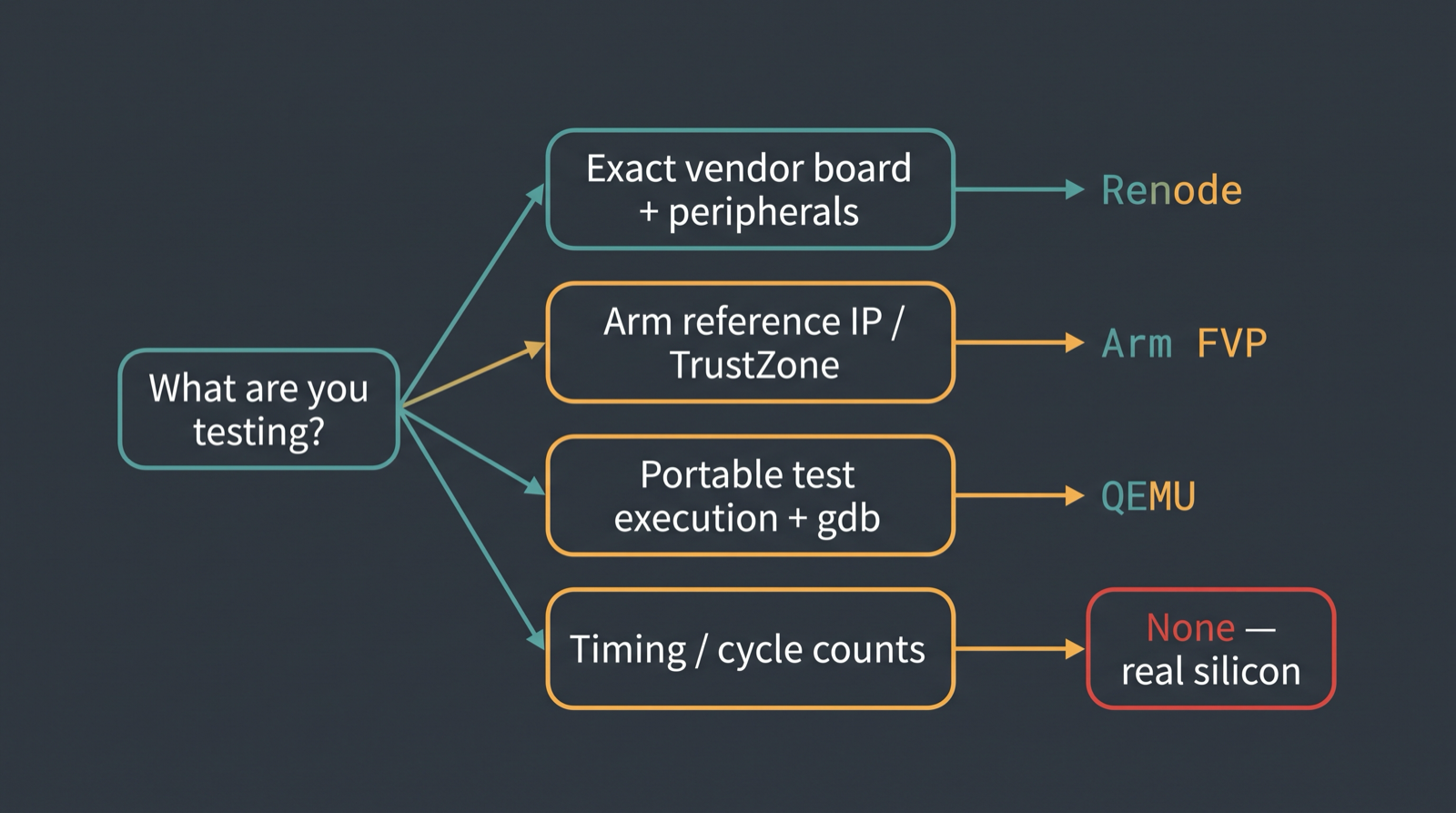
Renode is where most people land for board-level work, and not because of marketing. The BlueOS kernel project has a public issue proposing exactly that switch, with the reason stated flatly: "QEMU lacks extensive support for cortex-m series devices and built-in performance analysis tools on embedded MCU environment."10 Post 21 works through the full field of Renode alternatives, and post 07 puts Renode and QEMU on the same firmware side by side. Chiplab runs Renode 1.16.1 behind an MCP server, which is how the probe above ran with nothing installed locally — and it inherits the same over-generous memory map.
Is there a QEMU STM32F4 Discovery machine?
No. There are five STM32 machines in qemu-system-arm -machine help and none of them is
an F4 Discovery. The nearest relatives are netduinoplus2 and olimex-stm32-h405, both
STM32F405RGT6 — same core, same 128 KB of SRAM, different board wiring.
netduinoplus2 is not my board. It doesn't have my LEDs, my clock tree, or my USART
pinout. It got the one thing right that mattered, refused to run my firmware, and said so
in one ugly line with no stack trace and no advice. The board that pretended to be mine
ran it happily for months.
Update, 2026-08-04: QEMU was right, and now it runs it
We fixed the linker script. RAM is declared 128K now, the initial stack pointer sits at
0x20020000, and the same example rebuilt without ceremony.
$ qemu-system-arm -machine netduinoplus2 -cpu cortex-m4 \
    -kernel hello-stm32f4-discovery -nographic -serial null -serial mon:stdio

Hello world!
That is the whole output, on the second serial, because netduinoplus2 wires
-serial mon:stdio to USART1 and this firmware talks on USART2. No lockup, no register
dump. The machine that spent this entire post looking like the broken one was the only one
telling the truth, and it runs the corrected binary fine.
Chiplab agrees, for the record: SP = 0x20020000, usart2: Hello world!. It agreed before
the fix too. That was the problem.
Sources
Footnotes
-
STMicroelectronics. STM32F405xx/407xx datasheet (DS8626), memory map: SRAM 112 KB at 0x20000000,
0x2002 0000 - 0x3FFF FFFFreserved, CCM data RAM at 0x10000000. https://hangpersonal.com/wp-content/uploads/2024/10/STM32F407-Memory-Mapping.pdf ↩ ↩2 -
QEMU Project. "M-profile CPU architecture support," Arm CPU architecture support. https://www.qemu.org/docs/master/system/arm/emulation.html ↩ ↩2
-
QEMU Project. "STMicroelectronics STM32 boards (
netduino2,netduinoplus2,olimex-stm32-h405,stm32vldiscovery)." https://www.qemu.org/docs/master/system/arm/stm32.html ↩ ↩2 -
QEMU Project. "Arm System emulator." https://www.qemu.org/docs/master/system/target-arm.html ↩ ↩2
-
QEMU Project. "TCG Instruction Counting." https://www.qemu.org/docs/master/devel/tcg-icount.html ↩
-
QEMU Project. "GDB usage." https://www.qemu.org/docs/master/system/gdb.html ↩
-
QEMU Project. "Semihosting," Emulation. https://www.qemu.org/docs/master/about/emulation.html ↩
-
Zephyr Project. "QEMU Emulation for ARM Cortex-M3." https://docs.zephyrproject.org/latest/boards/qemu/cortex_m3/doc/index.html ↩
-
Arm. "Arm FVP Simulation Models," Arm Virtual Hardware documentation. https://arm-software.github.io/AVH/main/simulation/html/index.html ↩
-
Eplankton. "Idea: Introduce Renode as an alternative to QEMU," vivoblueos/kernel issue #13, August 1, 2025. https://github.com/vivoblueos/kernel/issues/13 ↩